Example bot: Spread#
Spread is an example bot built on the Python SDK. Clone it, run it on your machine, and change it however you like. The code is on GitHub at uselayer/layer-spread-bot, under the MIT license.
It works across Kalshi and Polymarket US, and starts in paper mode: real order books, fake money.
What it does#
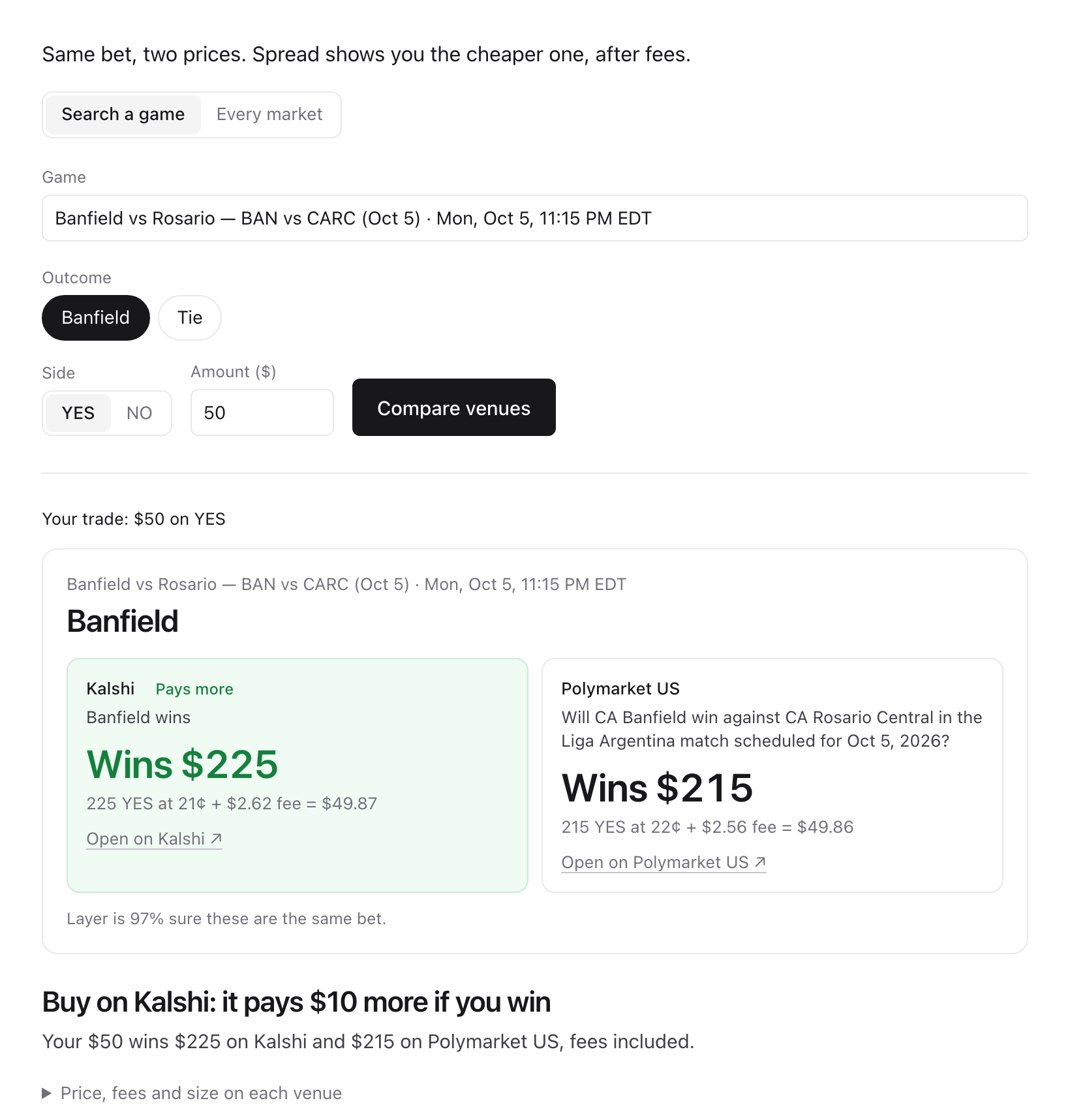
Example from Oct 5: $50 on Banfield to win. Kalshi pays $10 more if you win, fees included. On another bet it's Polymarket US.
Spread does the two jobs from the Quickstart, each on its own screen:
- Best venue. You, your strategy, or "Every market" decides the trade, for example "$50 on YES for this outcome". Spread prices it on both venues from their live order books: how many contracts the amount buys on each, at what average price and fees, and what each pays if you win. Then it shows which venue pays more for the same money, after fees, and lets you test the order there with fake money. It never sends a real order.
- Arbitrage. Spread scans markets that are the same bet on both venues and looks for price gaps that are still money after fees, rules and depth. Most gaps aren't. Spread shows why each one was dropped, and lets you paper-trade the ones that survive.
What runs where#
| Piece | Where it runs |
|---|---|
| Which markets are the same bet, and where their rules differ | Layer's hosted matching (GET /v0/matches), called by the SDK with your Layer key |
| Prices, order books, fees, quotes, orders and paper fills | The SDK, on your machine, talking to each venue with your own keys |
| The engine: a small local service that runs the SDK for the app | Your machine, 127.0.0.1:8765. It answers only this machine. |
| The app: the two screens | Your machine, 127.0.0.1:3200 |
Nothing is hosted and nothing is deployed. Layer gets your Layer key, the market ids it gave you, and search words. It never sees prices, orders, positions or venue keys.
Set up#
You need Node 20+ and uv. uv fetches Python 3.11+ if you don't have it.
git clone https://github.com/uselayer/layer-spread-bot
cd layer-spread-bot
npm run setup              # the app's packages and the engine's Python packages
cp .env.example .env       # then add your keys
npm run dev                # starts the engine and the app together
Open http://127.0.0.1:3200. Ports in use? ENGINE_PORT=8775 WEB_PORT=3210 npm run dev.
Keys in .env:
| Key | What for |
|---|---|
LAYER_API_KEY |
Which markets are the same bet. Get one at uselayer.sh. |
KALSHI_KEY_ID, KALSHI_PRIVATE_KEY_PATH |
Reading Kalshi's order books. A read-only key is enough for paper mode. |
POLYMARKET_US_KEY_ID, POLYMARKET_US_SECRET_KEY |
Live orders, and Save prices for Replay (its live stream is read with your key; nothing is traded). Otherwise paper mode reads Polymarket US's public books without a key. |
.env is git-ignored. Each key goes only to its own service, and none is logged, shown in the app, or sent to Layer.
Try it in paper mode#
Everything here uses real order books and fake money.
Best venue → Search a game. Type a team or league in the Game box and pick a game, then an outcome, YES or NO and an amount in dollars, and click Compare venues. You see what that amount wins on each venue if you're right, fees included, and which one pays more. Each venue gets its own size: the most whole contracts the amount buys there. Test this order (fake money) then sends it to the venue that wins more, as a test: it fills against that venue's real order book with fake money and tells you what you got ("Filled 69 YES on Kalshi at 70¢ average: $49.32, fees included"). It never sends a real order, whatever
BOT_MODEsays. In your own bot, the uselayer SDK does the same routing for real in one call:client.buy_best(pair, "yes", spend=50).Best venue → Every market. Pick a group of markets and click Check every market. Each of the next 25 markets is compared for $50 on YES, the biggest difference in what you'd win first.
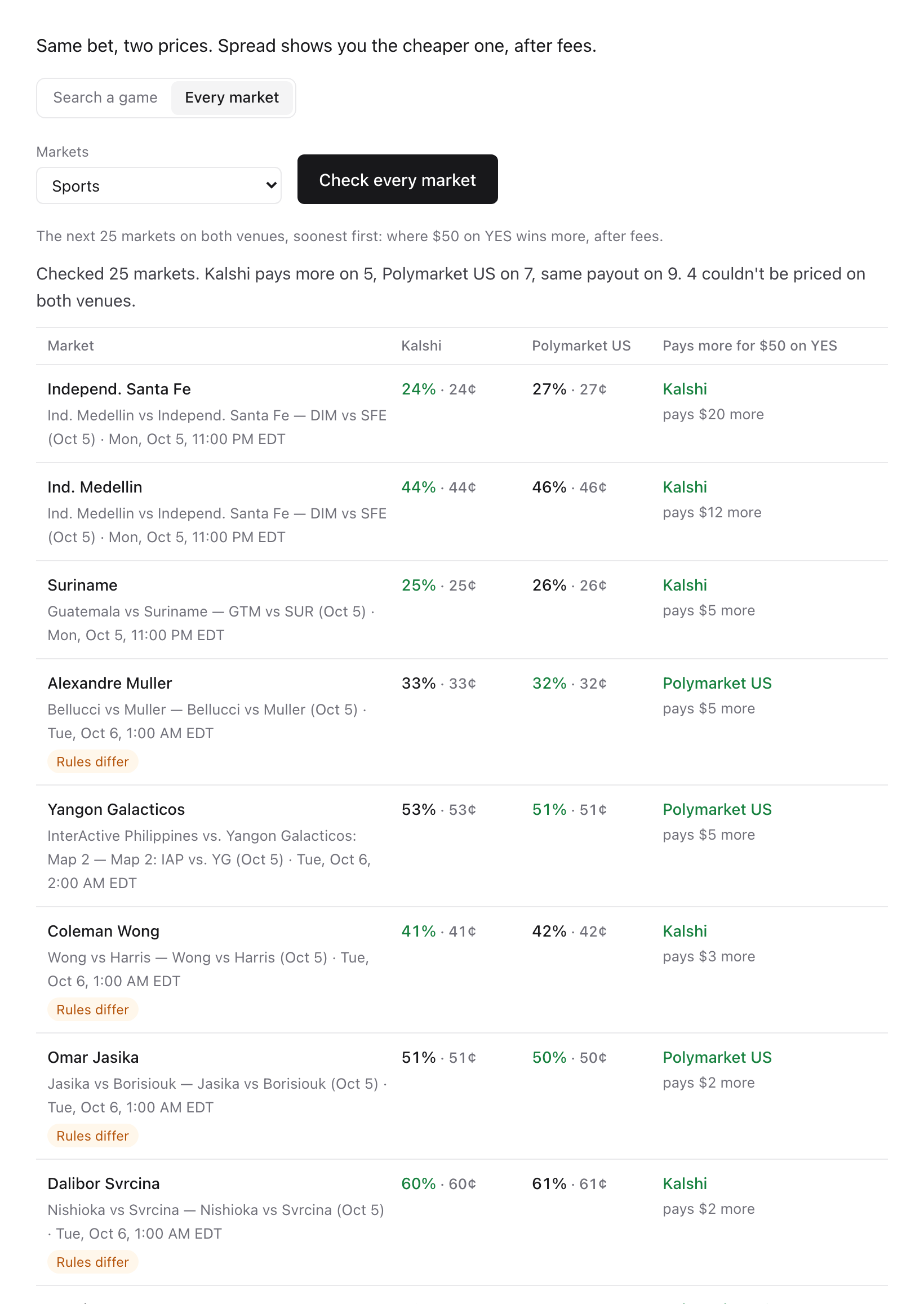
Example from Oct 5: the next 25 sports markets, and which venue pays more for $50 on YES.
Arbitrage → Live. Click Scan (about two minutes for 50 markets). The answer comes first: how many gaps are still money after fees, or why none is. If a gap is still profit after fees, click Paper-trade both sides to buy YES on one venue and NO on the other with fake money.
Arbitrage → Replay. Pick a game that's on now and click Save prices. When it's done, click Replay to see whether a gap would have made money after fees.
Paper account. After a paper trade, a line at the top of the Arbitrage screen shows what's open. Reset starts the fake account over.
How the arbitrage scan works#
Buying YES on one venue and NO on the other pays $1 a contract either way, so a price gap looks like free money. Every matched market goes through the same checks and stops at the first one it fails:
- Couldn't be priced. A venue didn't answer, asked for fewer requests, or its key is missing.
- Nobody selling. One venue has nobody selling one side.
- No gap. YES on one venue plus NO on the other costs $1.00 or more before fees.
- Fees bigger than the gap. There's a gap, but the two venues' fees are bigger.
- Under your minimum. Something is left after fees, but less than your minimum a contract.
- Too little for sale. The books can't fill even one contract that clears your minimum.
- Pays back too slowly. The return per day is under your minimum. A 2% gap paid in a month is worse than 1% paid tomorrow.
A gap that survives shows both venues side by side, then gross gap → fees → net → return per day. Every number comes from the SDK's client.quote(). Paper-trade both sides calls client.trade(), which reads both books again and buys only if the gap is still there after fees.
Rules differ slightly. Layer flags a match whose two markets differ on an edge case: a different data source, deadline, rounding, exception or definition. Spread doesn't drop it. It goes through the same checks and carries a warning: both pay the same in normal cases, but in a rare case one could pay and the other not. These are listed below the gaps whose rules match.
Expect most scans to end with no gap. When nothing is still money after fees, the right move is no trade.
Replay#
Replay re-runs prices you saved from a live game, moment by moment, to show whether a gap would have made money after fees. It runs the saved order books through the same checks, in the SDK's backtest mode.
Nothing comes pre-saved: the venues' terms don't let Spread ship their prices, so you save your own. On Arbitrage → Replay:
- Under Save prices, pick a game (games on now are listed first, since that's when prices move) and how long to save (30 minutes unless you pick otherwise).
- Click Save prices. Both venues' books for that game are saved while it trades, every change. You see the time left and how many price updates are saved so far. Stop ends it early and keeps what's saved.
- When it ends, the new file is selected under Saved prices. Click Replay.
The answer says how many moments were still money after fees and how long the gap lasted. Replays use each venue's fees as they were at the time. Saving prices needs your Kalshi key and your Polymarket US key: each venue's live stream is read with your own key, and nothing is traded.
Advanced: the same recording from a terminal, for any Kalshi ticker Layer has matched:
npm run record -- KXNBAGAME-26OCT05MEMATL-ATL --minutes 60Add your own strategy#
Your strategy decides the trade; Spread finds the cheaper venue for it. Each strategy is one Python file in engine/spread_engine/strategies/, and the engine lists every file there. Spread comes with examples for sports, crypto, and news, politics and economics. They're examples, not advice.
- Copy the starter file:
cp engine/spread_engine/strategies/my_strategy.py engine/spread_engine/strategies/momentum.py. - Give it a
NAME, aCATEGORYand a one-lineDESCRIPTION, and writedecide(): which market, YES or NO, how much in dollars, and the most you'll pay a contract.Signal(m, "yes", 50)is $50 on YES; the SDK works out how many contracts that buys on each venue. - Run it against the engine:
curl "http://127.0.0.1:8765/best/signal?strategy=momentum". Edits apply on the next run, without a restart.
from . import SPORTS, NoTrade, Signal, priced

NAME = "Momentum: buy YES under 40¢"
CATEGORY = SPORTS
DESCRIPTION = "Puts $50 on YES when it's under 40¢ on both venues."

def decide(matches, client):
    for m, p in priced(matches, client):  # open and worded the same on both venues, with both prices
        if p.a.yes_ask < 0.40 and p.b.yes_ask < 0.40:
            return Signal(m, "yes", 50, max_price=0.40, why="YES is under 40¢ on both venues.")  # $50 on YES
    return NoTrade("Nothing is under 40¢ on both venues right now.")
client is the SDK with your keys, so a strategy can read anything, for example client.prices(m) or client.book(m.kalshi). The helpers are in the README.
Paper and live#
- Paper (the default). Orders fill against the venues' real order books with fake money, in a local store on your machine. Nothing reaches a venue. A paper order reaches the book 0.7 seconds after it's sent, about how long a real Polymarket US order took, and fills against the book it meets then (
BOT_ORDER_LATENCY_Schanges it;0fills instantly). Spread never leaves an order waiting at a price. If you rest one with the SDK, paper mode's idea of your place in line is an estimate: the venues publish the total waiting at each price, not single orders. - Live. Set
BOT_MODE=livein.env, add the key for each venue you'll trade, and restart. Orders are then real, with your money, and the header shows a red LIVE badge. Only the exact wordliveturns it on.
Live or paper, every order goes through the SDK's guardrails: a budget across everything (BOT_BUDGET, $100 by default), a price collar, and a kill switch. Each order has a limit price and is immediate-or-cancel: it fills what's there at that price, and the rest is cancelled. A gap can still close before both orders fill, and the venues can settle the same event differently. See Python SDK for guardrails and the kill switch.
Next#
- Spread on GitHub: the full README, tests and every strategy.
- Python SDK: the calls Spread is built on.
- How matching works: why a match is the same bet.